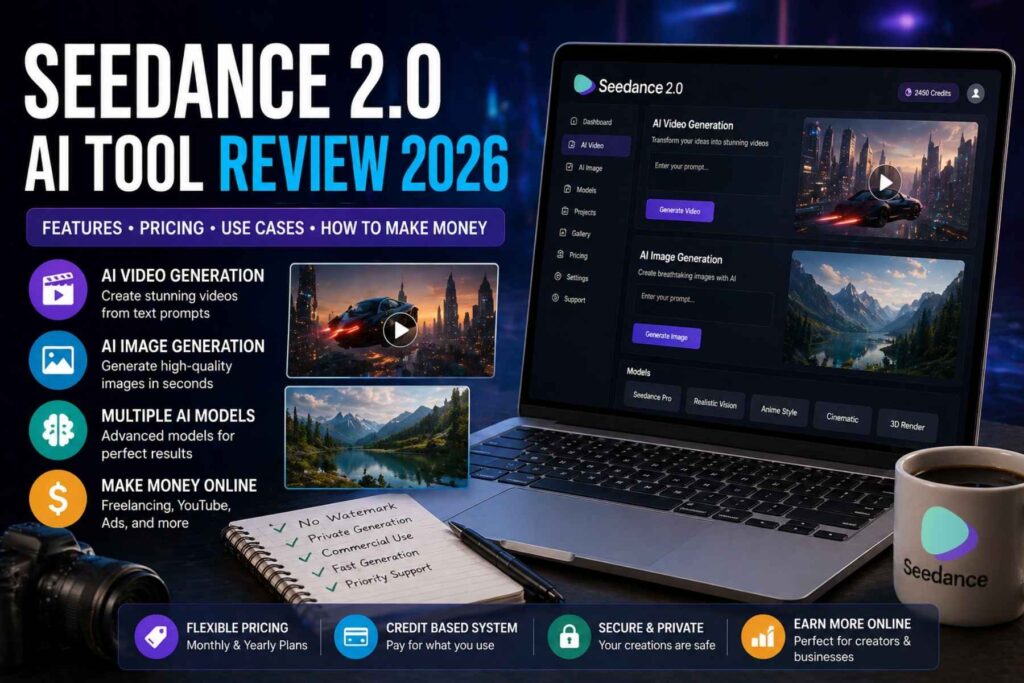
In 2026, artificial intelligence tools are changing the way people create content, design visuals, and produce videos for online platforms. One of the emerging platforms in this space is Seedance 2.0 AI Tool. It is designed to help creators, freelancers, marketers, and businesses generate AI-powered videos and images with ease.
This Seedance 2.0 AI Tool Review will explain everything in a simple and clear way, including its features, pricing structure, use cases, and how people can potentially earn money using it. The goal is to make this guide easy for beginners and useful for professionals who want to explore AI content creation.
Seedance 2.0 AI Tool is positioned as an all in one AI generation platform that focuses mainly on video creation, image generation, and multi model AI support. It reduces the need for complex editing software and allows users to create content faster using a credits based system.
What is Seedance 2.0 AI Tool
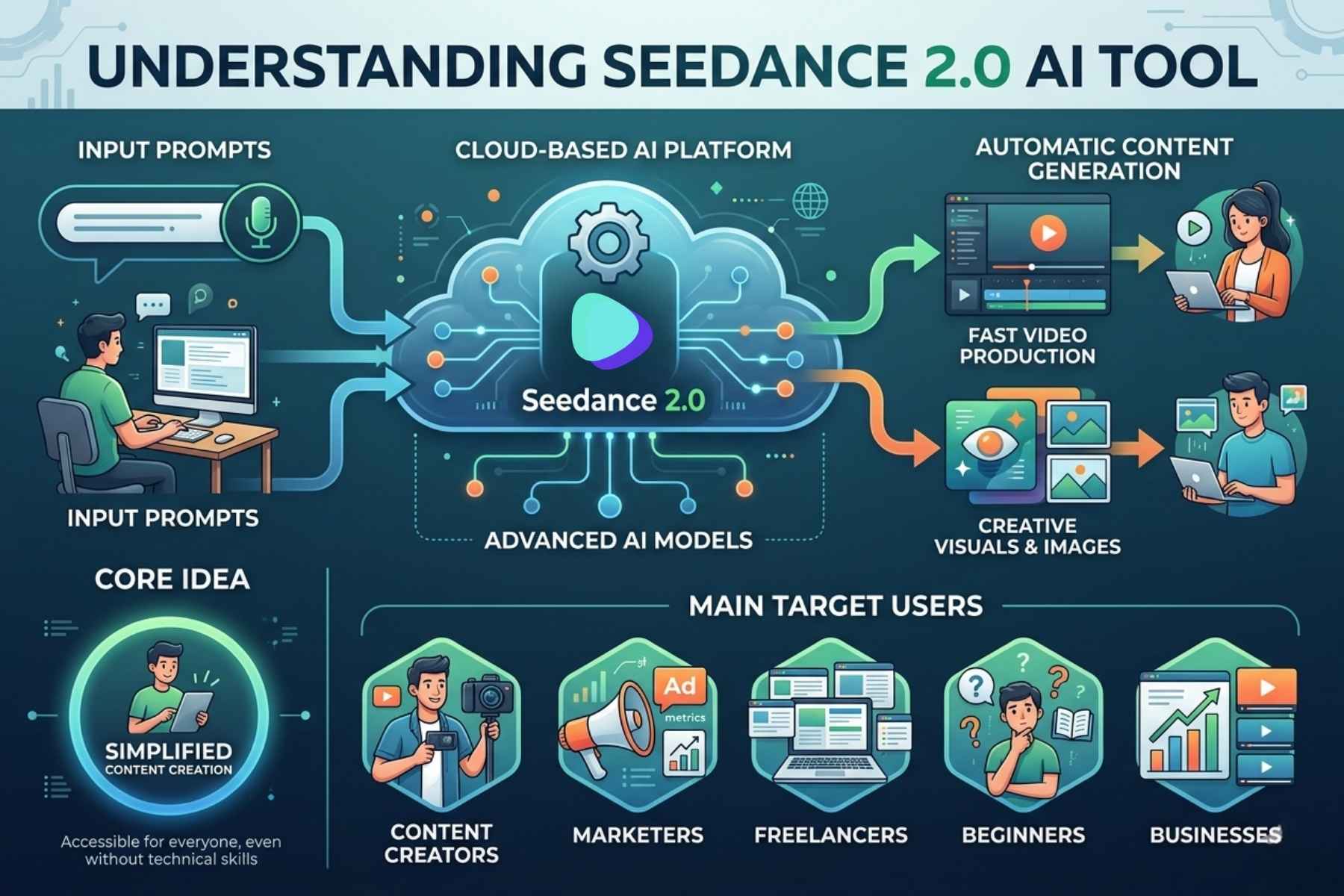
Seedance 2.0 AI Tool is a cloud based AI platform that allows users to generate videos and images using artificial intelligence models. Instead of manually editing videos or designing visuals, users simply input prompts and the system generates content automatically.
The platform is mainly built for:
Content creators who need fast video production
Marketers who want ad creatives
Freelancers offering AI content services
Beginners who want to explore AI tools
Businesses that need scalable visual content
The core idea behind Seedance 2.0 AI Tool is to simplify content creation and make it accessible for everyone, even those without technical skills.
How Seedance 2.0 AI Tool Works
The working system of Seedance 2.0 AI Tool is based on credits. Every action like generating a video or image consumes credits depending on the complexity and model used.
Here is a simple breakdown of the process:
First, the user selects the type of content they want to create, such as video or image.
Next, they enter a prompt describing what they want. For example, a cinematic scene, product advertisement, or animated concept.
Then, Seedance 2.0 AI Tool processes the request using its AI models.
Finally, the system generates output which can be downloaded or used directly.
This process removes the need for manual editing, making content creation much faster and more efficient.
Key Idea Behind Seedance 2.0 AI Tool
The main idea behind Seedance 2.0 AI Tool is automation. Instead of spending hours editing videos or designing images, users can generate professional content in minutes.
It focuses on three major areas:
AI Video Generation
AI Image Creation
Multi Model AI Processing
These features are designed to support creators who want to scale their content production without hiring a full production team.
First Impressions and User Experience
From a user experience perspective, Seedance 2.0 AI Tool is built to be simple and beginner friendly. The dashboard is structured in a way that users can quickly access video or image generation tools.
The platform also supports private generation, which means users can create content without making it public. This is useful for professionals and businesses who want to maintain privacy.
Another important aspect is that most plans offer no watermark output, which is very important for commercial use and branding purposes.
Why Seedance 2.0 AI Tool is Getting Attention
Seedance 2.0 AI Tool is gaining attention in the AI space because it combines multiple features into one platform. Instead of using separate tools for video editing, image generation, and AI modeling, users can access everything in one place.
Some key reasons for its popularity include:
- Easy to use interface
- Fast AI content generation
- Multiple AI models support
- No watermark output in paid plans
- Commercial use options in higher plans
- Flexible credit based system
These factors make it attractive for both beginners and professionals.
Limitations to Consider
Although Seedance 2.0 AI Tool offers many features, it also has some limitations that users should understand:
- Free plan does not include commercial use license
- Credit based system may limit heavy usage on lower plans
- Advanced features require higher subscription plans
- Output quality depends on prompt accuracy
Understanding these limitations helps users choose the right plan and avoid confusion.
Features Deep Dive (Video, Image, AI Models & Workflow)
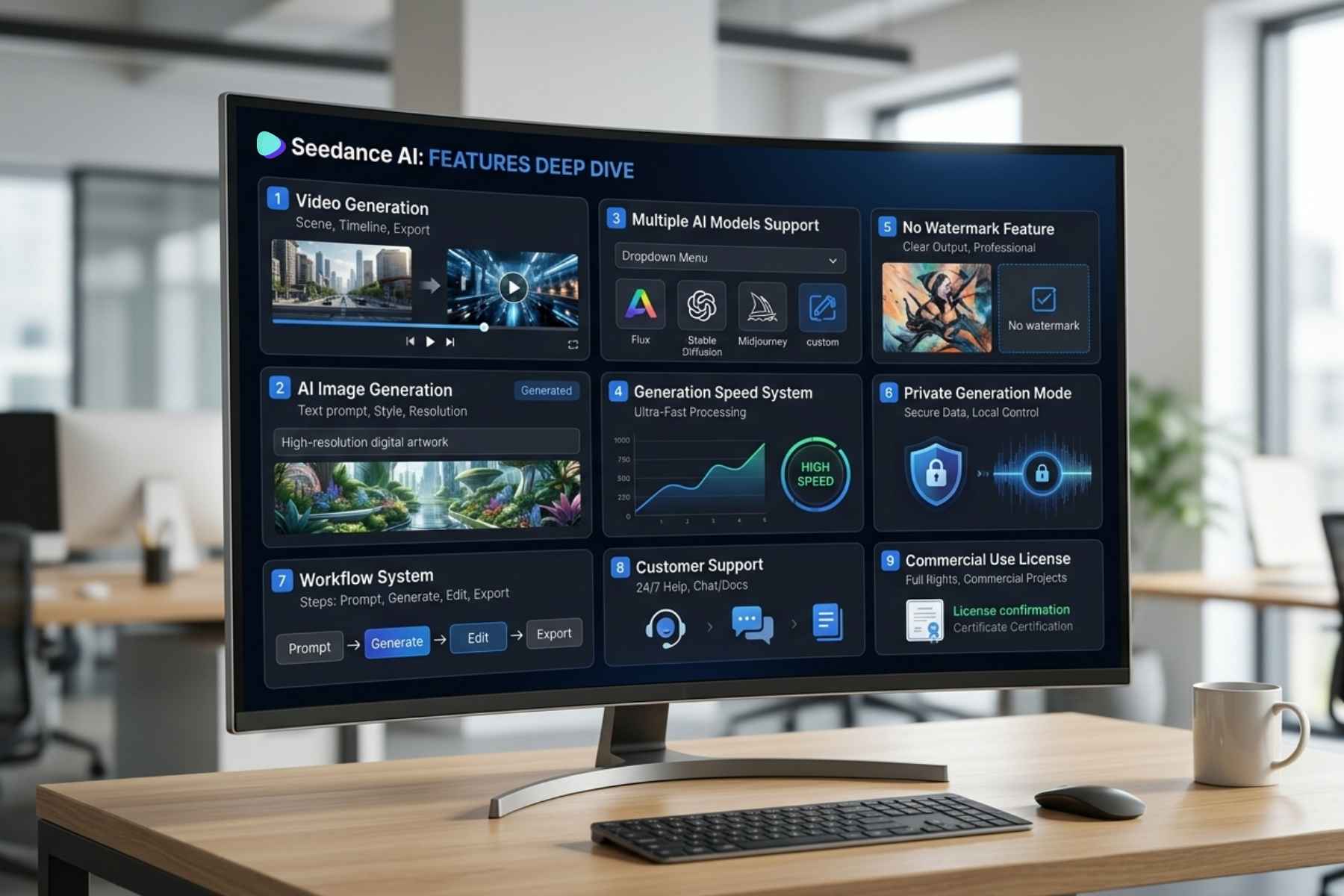
1. Seedance AI Video Generation Feature
The most powerful feature of Seedance 2.0 AI Tool is its AI Video Generation system.
This feature allows users to create professional videos just by writing text prompts.
How it works
You simply describe what you want, for example: “A cinematic drone shot of a futuristic city at sunset with flying cars”
Then Seedance 2.0 AI Tool uses its AI model to generate a video based on your description.
What you can create
- Cinematic videos
- Product advertisement videos
- Animation style clips
- Social media content
- Storytelling scenes
- Marketing videos
Why it is powerful
- No editing skills needed
- No software installation required
- Fast video generation
- Professional quality output
This makes it very useful for YouTubers, TikTok creators, and marketers.
2. AI Image Generation System
Seedance 2.0 AI Tool also includes a powerful AI Image Generator.
This tool converts text prompts into high quality images.
Example prompt
“Futuristic robot standing in a neon cyberpunk city”
Output type
- Realistic images
- Digital art
- Concept designs
- Marketing visuals
- Product mockups
Use cases
- Thumbnail creation
- Social media posts
- Blog images
- Brand design concepts
This feature is very useful for designers and content creators who need fast visuals.
3. Multiple AI Models Support
One of the strongest points of Seedance 2.0 AI Tool is that it supports multiple AI models.
This means users are not limited to a single generation style.
Benefits
- Different video styles
- Different image outputs
- Better creative control
- More flexibility in content creation
For example, one model may focus on cinematic videos, while another may focus on realistic product visuals.
4. Generation Speed System
Seedance 2.0 AI Tool offers different speed levels depending on your plan.
Speed types
- Standard speed (basic plans)
- Priority generation (mid plans)
- Fastest generation (pro plans)
Higher plans process requests faster, which is useful for professionals and agencies.
5. No Watermark Feature
One of the most important features is No Watermark Output.
Why this matters
- Content looks professional
- Suitable for commercial use
- Can be used in client projects
- Branding becomes clean
This feature is available in all paid plans, which makes it very valuable for freelancers and agencies.
6. Private Generation Mode
Seedance 2.0 AI Tool also supports private content generation.
What it means
- Your generated content is not public
- Only you can access it
- Useful for business projects
- Safe for client work
This is especially important for professionals handling sensitive projects.
7. Seedance AI Workflow System
The workflow of Seedance 2.0 AI Tool is very simple and beginner friendly.
Step by step process
- Login to platform
- Choose Video or Image tool
- Enter prompt
- Select AI model
- Choose quality or speed option
- Generate content
- Download or use directly
No technical knowledge is required.
8. Customer Support System
Seedance 2.0 AI Tool includes support depending on your plan:
- Basic users → Standard support
- Standard users → Priority support
- Pro users → Expert team support
Higher plans get faster response and professional help.
9. Commercial Use License
Commercial usage depends on your plan.
Free / Basic plan
- No commercial license
Paid plans
- Full commercial rights included
This means you can sell content or use it for client work.
Summary of Features (Simple View)
Seedance 2.0 AI Tool provides:
- AI Video Generation
- AI Image Creation
- Multiple AI Models
- Fast Generation System
- No Watermark Output
- Private Mode
- Commercial License (paid plans)
- Credit based usage system
Pricing Breakdown (Monthly vs Yearly) + Best Plan Choice
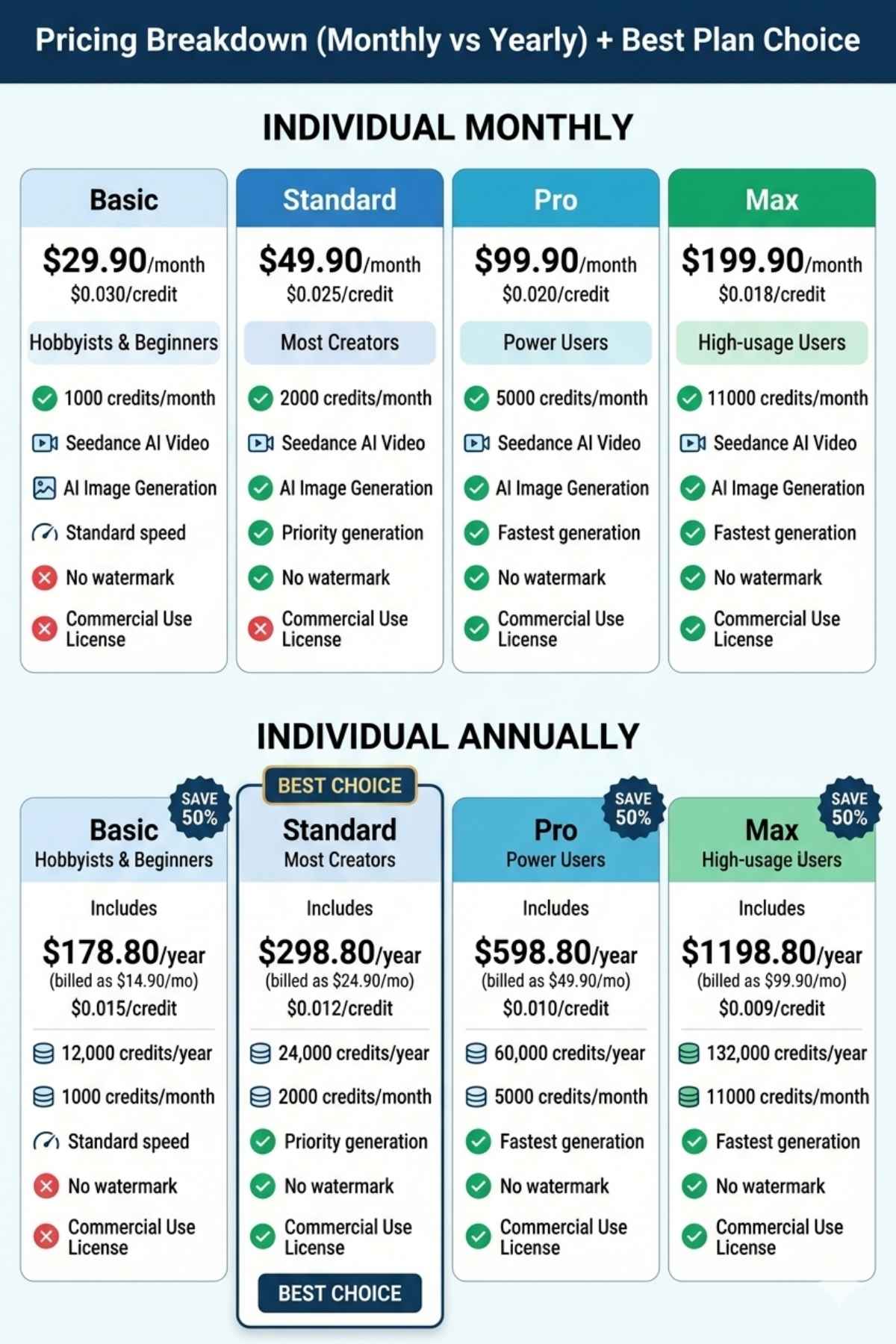
1. Monthly Pricing Plans (Individual)
Basic Plan
Best for beginners and hobby users
- Price: $29.90 / month
- Credit rate: $0.030 / credit
- Credits: 1000 credits/month
Features
- Seedance AI Video access
- Multiple AI video models
- AI Image generation
- Standard generation speed
- No watermark output
- Private generation
- Customer support
- No commercial license
Who should use it?
This plan is best for:
- Beginners
- Students
- Personal experimentation
- Learning AI tools
Standard Plan
Best for most content creators
- Price: $49.90 / month
- Credit rate: $0.025 / credit
- Credits: 2000 credits/month
Features
- All Basic features included
- Priority generation speed
- No watermark output
- Private generation
- Priority customer support
- Commercial use license included
Who should use it?
- YouTubers
- Freelancers
- Social media creators
- Small agencies
Pro Plan
Best for power users and professionals
- Price: $99.90 / month
- Credit rate: $0.020 / credit
- Credits: 5000 credits/month
Features
- Fastest generation speed
- Expert team support
- Multiple AI models
- Commercial license included
- No watermark output
Who should use it?
- Agencies
- Professional video creators
- Marketing teams
- High volume users
Max Plan
Best for heavy usage and businesses
- Price: $199.90 / month
- Credit rate: $0.018 / credit
- Credits: 11000 credits/month
Features
- Maximum credits
- Fastest AI processing
- Expert support
- Full commercial usage
- Priority system access
Who should use it?
- Large agencies
- Production companies
- High-scale content businesses
2. Yearly Pricing Plans (Discounted 50%)
Yearly plans are much cheaper and save up to 50 percent.
Basic Yearly Plan
- Price: $14.90 / month (billed yearly)
- Total yearly cost: $178.80
Credits
- 12,000 credits/year
- 1000 credits/month
Includes
- AI video + image tools
- No watermark
- Private generation
- commercial license
Standard Yearly Plan
- Price: $24.90 / month
- Total yearly cost: $298.80
Credits
- 24,000 credits/year
- 2000 credits/month
Includes
- Priority generation
- Commercial license
- Priority support
Pro Yearly Plan
- Price: $49.90 / month
- Total yearly cost: $598.80
Credits
- 60,000 credits/year
- 5000 credits/month
Includes
- Fastest speed
- Expert support
- Full commercial rights
Max Yearly Plan
- Price: $99.90 / month
- Total yearly cost: $1198.80
Credits
- 132,000 credits/year
- 11000 credits/month
Includes
- Maximum performance
- Enterprise-level usage
- Expert support
- Full commercial license
3. Monthly vs Yearly Comparison
Monthly Plans
- Flexible
- Good for short term users
- Higher cost per credit
Yearly Plans
- 50 percent cheaper
- Best value for money
- Ideal for long-term creators
4. Which Plan is Best for You?
Beginners
Basic plan (monthly or yearly)
Content creators
Standard plan (best balance)
Freelancers & marketers
Pro plan (recommended)
Agencies / businesses
Max plan (high volume usage)
5. Value Analysis
Seedance 2.0 AI Tool pricing is designed in a way that:
- Lower plans = learning and testing
- Mid plans = content creation
- High plans = business production
The more you upgrade, the more:
- Speed increases
- Credits increase
- Commercial freedom increases
Real Use Cases (Video, Image, Freelancing, Marketing)
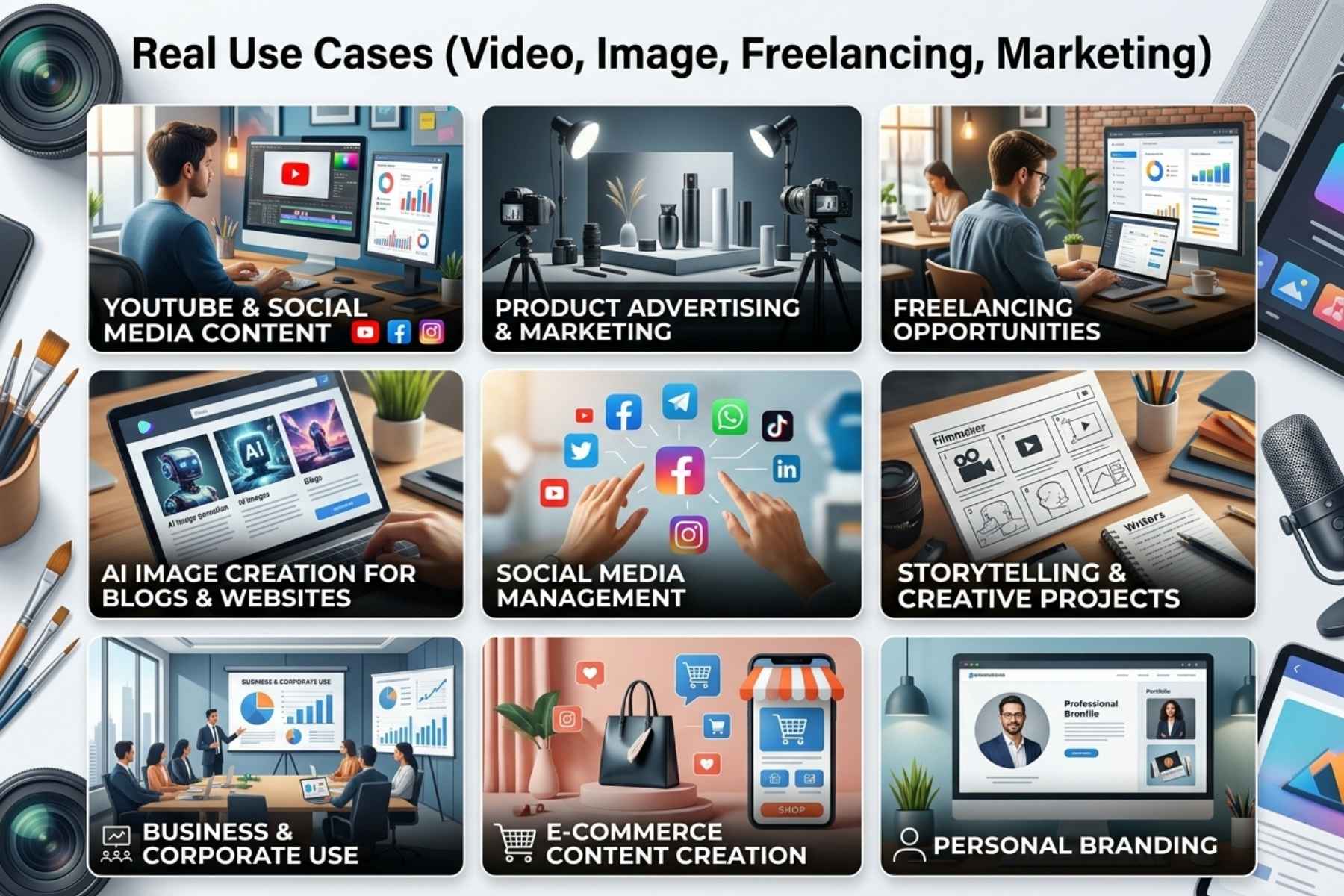
1. Content Creation for YouTube and Social Media
One of the biggest use cases of Seedance 2.0 AI Tool is content creation.
How creators use it
Creators write a simple prompt like: “A motivational cinematic scene with sunrise and success theme”
Then Seedance 2.0 AI Tool generates a video which can be used for:
- YouTube videos
- TikTok clips
- Instagram reels
- Facebook content
Benefits
- Saves time
- No camera required
- No editing skills needed
- Consistent content production
This is especially useful for faceless YouTube channels.
2. Product Advertisement and Marketing
Businesses and marketers use Seedance 2.0 AI Tool to create ad creatives.
Example
Prompt:
“A modern product advertisement for a smartwatch with clean background and luxury lighting”
Output
- Product video ads
- Promotional visuals
- Brand storytelling clips
Why it is useful
- No need for expensive shoots
- Faster ad testing
- Easy to create multiple variations
This helps marketers scale campaigns quickly.
3. Freelancing Opportunities
Freelancers can use Seedance 2.0 AI Tool to offer services on platforms like Fiverr and Upwork.
Services you can offer
- AI video creation
- Social media content
- YouTube intro videos
- AI generated ads
- Image design
Why clients hire
- Fast delivery
- Low cost production
- Creative output
With the commercial license in paid plans, freelancers can legally sell content.
4. AI Image Creation for Blogs and Websites
Bloggers and website owners need images regularly. Seedance 2.0 AI Tool solves this problem.
Use cases
- Blog featured images
- Article illustrations
- Website banners
- Thumbnails
Example prompt
“A clean modern workspace with laptop and coffee for blog header”
Benefits
- No need for stock images
- Unique visuals
- SEO friendly content
5. Social Media Management
Social media managers use Seedance 2.0 AI Tool to create daily content.
What they create
- Posts
- Reels
- Stories
- Visual campaigns
Advantage
- Bulk content creation
- Faster workflow
- Consistent branding
This is very helpful for agencies managing multiple clients.
6. Storytelling and Creative Projects
Creative users can generate storytelling videos using prompts.
Example
“A short cinematic story of a boy dreaming about success”
Output
- Short films
- Visual storytelling clips
- Creative animations
This opens new opportunities for digital storytelling.
7. Business and Corporate Use
Companies can use Seedance 2.0 AI Tool for internal and external content.
Use cases
- Training videos
- Presentation visuals
- Marketing campaigns
- Brand content
Benefits
- Cost reduction
- Faster production
- Scalable content creation
8. E-commerce Content Creation
E-commerce sellers can generate product visuals and videos.
What they create
- Product showcase videos
- Listing images
- Promotional ads
Result
- Better product presentation
- Higher conversion rates
- Faster listing creation
9. Personal Branding
Individuals can build their personal brand using AI content.
Examples
- Motivational pages
- Educational content
- Business profiles
Benefit
- Consistent posting
- Unique visuals
- Fast growth potential
Summary of Use Cases
Seedance 2.0 AI Tool can be used for:
- YouTube content creation
- Social media videos
- Freelancing services
- Blog and website visuals
- Marketing and ads
- E-commerce content
- Storytelling projects
- Business presentations
Step by Step Guide (How to Use Video and Image Features Properly)
1. Understanding the Credit System First
Before using Seedance 2.0 AI Tool, you need to understand how credits work.
- Every video or image generation uses credits
- More complex prompts may use more credits
- Higher quality or longer videos consume more credits
So always plan your prompts carefully to avoid wasting credits.
2. How to Create AI Videos (Step by Step)
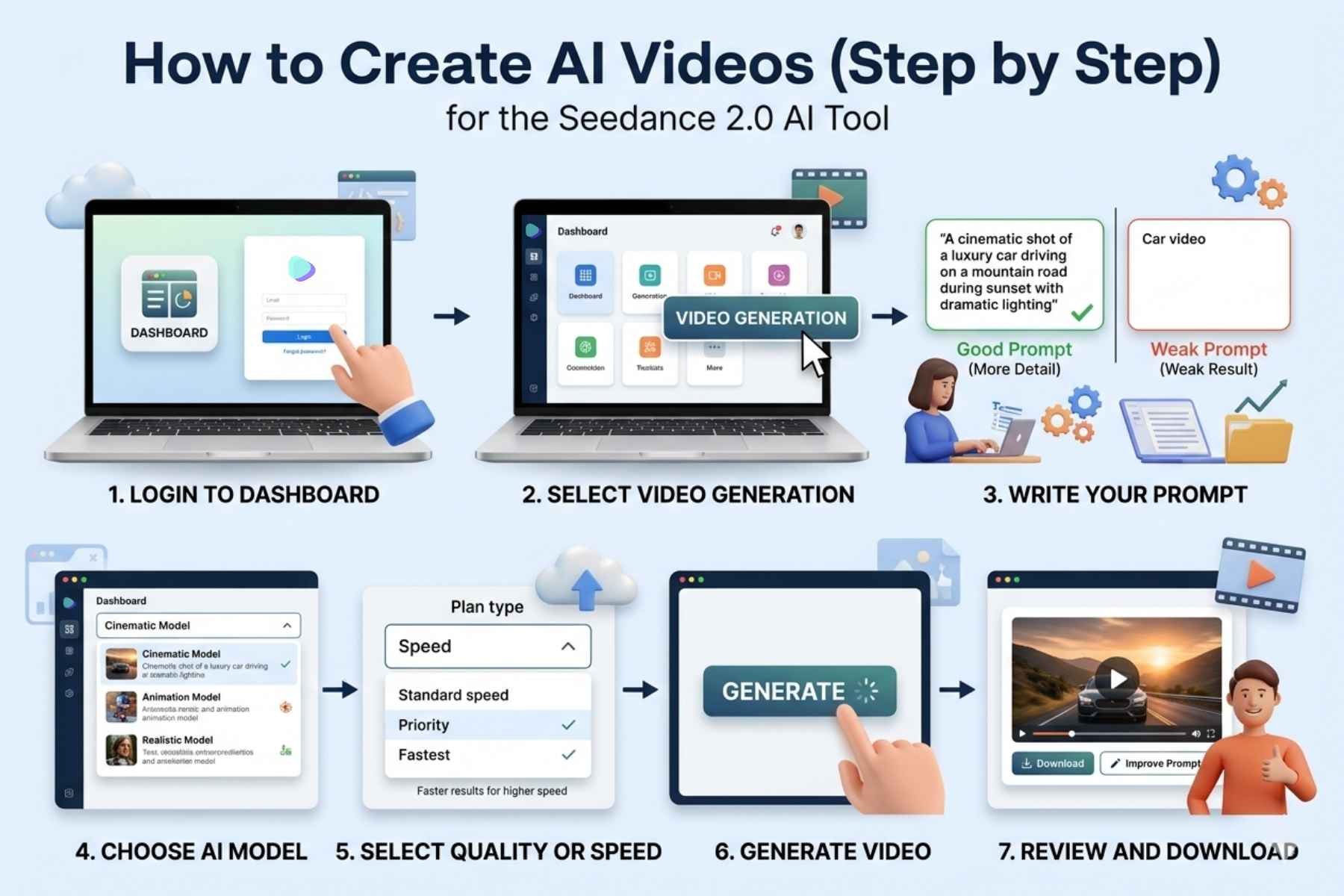
This is the main feature of Seedance 2.0 AI Tool.
Step 1: Login to Dashboard
Open the platform and go to your dashboard.
Step 2: Select Video Generation
Choose the AI Video option from the menu.
Step 3: Write Your Prompt
This is the most important step.
Example Prompt (Good) “A cinematic shot of a luxury car driving on a mountain road during sunset with dramatic lighting”
Bad Prompt (Weak) “Car video”
The more detailed your prompt is, the better your result will be.
Step 4: Choose AI Model
Seedance 2.0 AI Tool gives multiple models.
- Some are better for cinematic videos
- Some are better for animation
- Some are better for realistic scenes
Test different models to find the best result.
Step 5: Select Quality or Speed
Depending on your plan:
- Basic → Standard speed
- Standard → Priority
- Pro/Max → Fastest
Higher speed means faster results.
Step 6: Generate Video
Click generate and wait.
The system will process your request and create a video.
Step 7: Review and Download
Check the output.
- If good → download
- If not → improve prompt and try again
3. How to Create AI Images (Step by Step)
Image generation is very simple but powerful.
Step 1: Select Image Generator
Go to the image section.
Step 2: Enter Prompt
Example Prompt: “A modern office workspace with laptop, coffee and minimal design, soft lighting”
Step 3: Choose Style (if available)
- Realistic
- Artistic
- Concept design
Step 4: Generate Image
Click generate and wait for output.
Step 5: Download or Use
Use images for:
- Blog posts
- Thumbnails
- Social media
- Ads
4. How to Write Better Prompts (Important)
Your results depend heavily on your prompt.
Good Prompt Structure
Include these elements:
- Subject
- Environment
- Style
- Lighting
- Camera angle
Example “A realistic portrait of a businessman in a modern office, soft lighting, professional look, high detail”
Tips for Better Results
- Be specific
- Avoid very short prompts
- Add details like lighting and mood
- Test multiple variations
- Learn from each output
5. Pro Tips to Save Credits
Since Seedance 2.0 AI Tool uses credits, you should use them wisely.
Smart strategies
- Start with simple prompts
- Test with low quality first
- Improve prompt before final generation
- Avoid random experimenting
6. Using Private Mode Properly
Always keep private mode ON when:
- Working for clients
- Creating paid content
- Building brand assets
This keeps your work secure.
7. Using Commercial License Correctly
If you are using Standard, Pro, or Max plan:
- You can sell videos
- You can work with clients
- You can monetize content
If you are on a Basic monthly plan, avoid selling content because commercial rights are not included.
8. Common Mistakes to Avoid
Many beginners make these mistakes:
- Writing weak prompts
- Using credits without planning
- Not testing models
- Expecting perfect results instantly
- Ignoring prompt improvement
Avoiding these mistakes will save time and money.
Summary of Usage
Using Seedance 2.0 AI Tool is simple if you follow the process:
- Write clear prompts
- Choose correct model
- Generate content
- Improve results step by step
1. How to Make Money Using Seedance 2.0 AI Tool
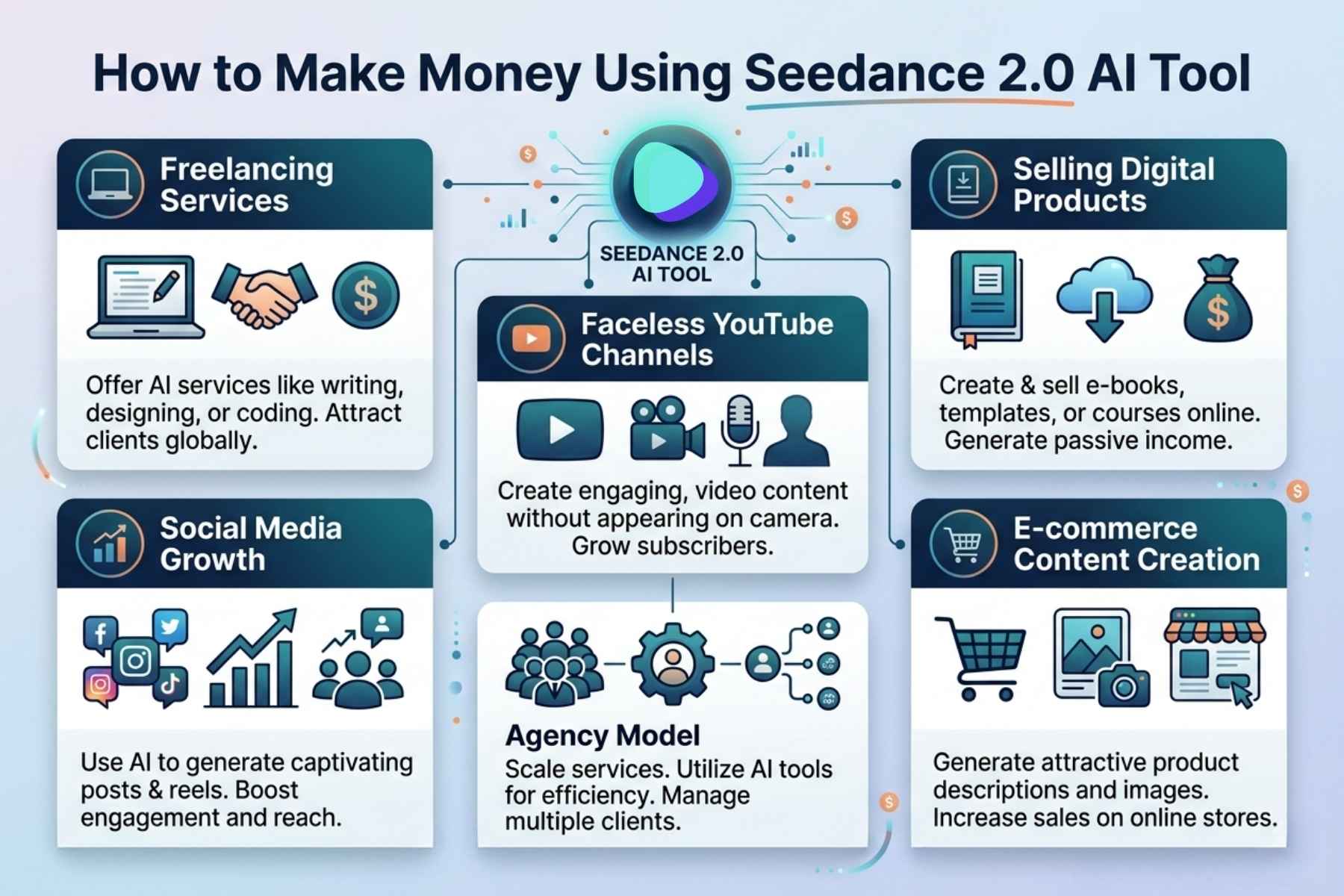
Seedance 2.0 AI Tool is not just for content creation. It can also be used to build income streams if used correctly.
Method 1: Freelancing Services
This is the easiest and most common way.
What you can sell
- AI generated videos
- Social media content
- YouTube intros and outros
- Product ads
- AI images for blogs
Where to sell
- Fiverr
- Upwork
- Freelancer
Strategy
Create gigs like:
“I will create AI video ads using Seedance 2.0 AI Tool”
Earning potential
- Beginners: $50 to $200 per month
- Intermediate: $300 to $1000
- Advanced: $2000+
Method 2: Faceless YouTube Channels
You can create YouTube content without showing your face.
Process
- Generate videos using Seedance 2.0 AI Tool
- Add voiceover
- Upload consistently
Content ideas
- Motivation videos
- Facts videos
- Storytelling
- AI generated visuals
Monetization
- YouTube ads
- Affiliate links
- Sponsorships
Method 3: Selling Digital Products
You can create and sell:
- Stock videos
- AI images
- Templates
- Social media packs
Platforms
- Etsy
- Gumroad
- Creative Market
Method 4: Social Media Growth
Grow a page using AI content.
Platforms
- TikTok
Monetization
- Brand deals
- Paid promotions
- Affiliate marketing
Method 5: Agency Model
Start your own AI content agency.
Services
- Ad creatives
- Video marketing
- Content creation
Clients
- Small businesses
- E-commerce stores
- Influencers
Advantage
You can scale fast because AI reduces workload.
Method 6: E-commerce Content Creation
Create product videos for sellers.
What you offer
- Product ads
- Visual content
- Promo videos
Why it works
Businesses always need content to sell products.
2. Best Strategy to Start Earning
If you are a beginner:
Start with freelancing
Then move to YouTube or social media
Later build your own brand or agency
Consistency is the key.
Frequently Asked Questions
Q1: Is Seedance 2.0 AI Tool free?
It offers a credit based system, but full features require paid plans.
Q2: Can beginners use Seedance 2.0 AI Tool?
Yes, it is beginner friendly and does not require technical skills.
Q3: Is commercial use allowed?
Only in Standard, Pro, and Max plans. Basic monthly plan does not include it.
Q4: What is the main use of Seedance 2.0 AI Tool?
It is mainly used for AI video and image generation.
Q5: Does it add a watermark?
No, paid plans provide no watermark output.
Q6: Which plan is best?
A standard plan is best for most users because it balances price and features.
Q7: Can I make money with it?
Yes, through freelancing, YouTube, digital products, and marketing.
Final Conclusion
Seedance 2.0 AI Tool is a powerful and practical AI platform for modern content creation. It combines video generation, image creation, and multiple AI models into one system, making it a useful tool for both beginners and professionals.
The credit based pricing system allows flexibility, while higher plans unlock commercial opportunities and faster performance. Its ability to generate content quickly without technical skills makes it highly valuable in today’s digital economy.
However, success with Seedance 2.0 AI Tool depends on how well you use prompts and manage credits. It is not a magic solution, but a powerful tool that requires smart usage.
Final Verdict
- Easy to use
- Powerful features
- Good for beginners and professionals
- Strong earning potential
- Best value in yearly plans
Explore More: Meta AI Tool 2026: Complete Guide to Features, Uses & How to Make Money